


Building web applications traditionally demands teams of developers, weeks of planning, and significant budgets. BLDR AI changes that equation by letting anyone describe an idea in plain English and receive a functional, production-ready full-stack web app almost instantly.
Whether you run a small business needing a client portal, a solo founder validating an SaaS concept, or a developer accelerating prototyping, BLDR AI handles the heavy lifting. It scaffolds React-based frontends with Tailwind CSS, serverless APIs, SQL databases, authentication systems, and more—all while giving you full code ownership for customization or self-hosting.
This guide explores everything about BLDR AI: how it works in practice, its standout features, real user scenarios, pricing details, comparisons to alternatives, best practices, and what the future holds. By the end, you’ll understand exactly when and how to use it to ship faster without compromising on quality or control.
What is BLDR AI?
BLDR AI is an AI-driven platform designed specifically for creating full-stack web applications from simple text descriptions. Unlike basic no-code tools that focus only on interfaces or generate static prototypes, BLDR AI delivers complete, interconnected systems ready for real users.
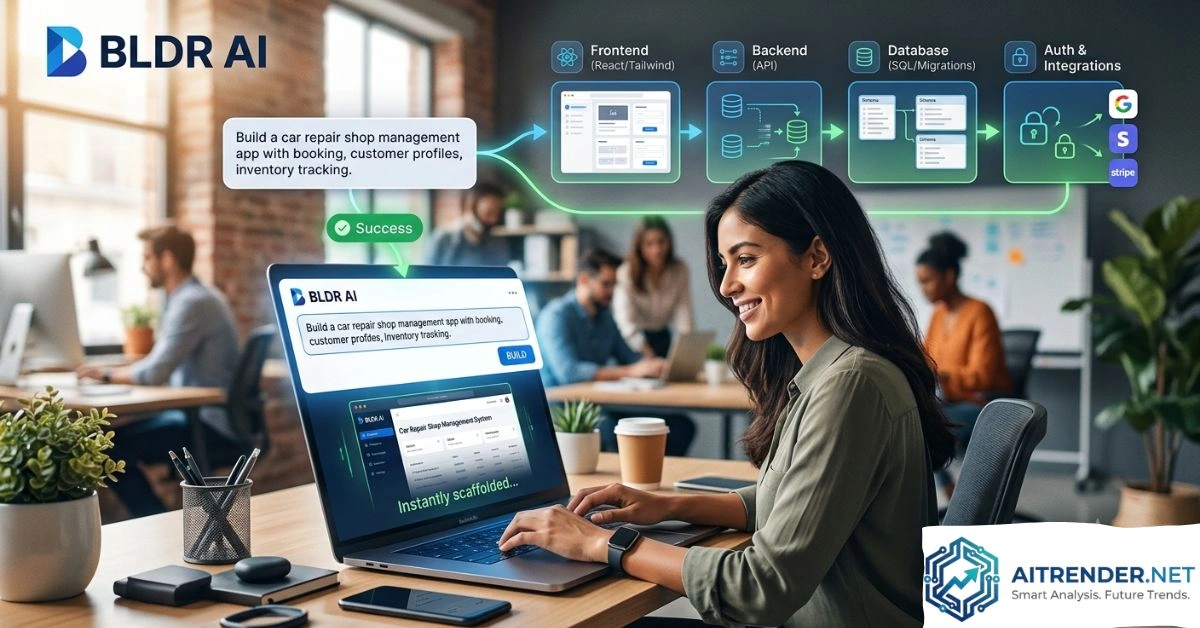
At its core, the tool interprets your prompt—such as “Build a car repair shop management website with appointment booking, customer profiles, and inventory tracking”—and automatically generates:
- Responsive frontend pages and components
- Backend API routes with proper validation
- Database schemas, migrations, and seed data
- Authentication and authorization logic
- Basic integrations for common services
It runs on modern, developer-friendly stacks: Next.js for the frontend, serverless API routes for the backend, and SQL databases. This choice keeps the output clean, performant, and extensible rather than locking you into proprietary formats.
The platform emphasizes speed without sacrificing ownership. You can iterate via chat, export the full TypeScript codebase, deploy with one click to their hosting, or move everything to your own infrastructure. This hybrid approach appeals to both non-technical founders who want quick results and experienced developers who need flexibility.
How BLDR AI Works
The process feels remarkably straightforward, yet the underlying technology handles complex orchestration.
Step 1: Describe Your Idea
You enter a natural language prompt detailing the app’s purpose, key pages, features, and any specific requirements. The AI often asks clarifying questions to refine the scope, much like a senior developer would during requirements gathering.
Step 2: AI Scaffolding
BLDR AI generates the full project structure. This includes:
- UI components with responsive layouts
- API endpoints for CRUD operations and business logic
- Database models with relationships and indexes
- Authentication flows (Google, email, etc.)
- Basic admin interfaces and seed data
Generation typically completes in minutes, not hours.
Step 3: Iterate and Customize
Use the built-in chat interface to request changes: “Add Stripe payments for bookings” or “Make the dashboard show real-time analytics.” The AI updates the relevant parts while maintaining consistency across the stack.
Step 4: Test, Deploy, or Export
Preview the app, test functionality, then deploy instantly or export clean code. Environment management, secrets handling, and monitoring come built-in for production use.
This workflow compresses what used to take development sprints into an afternoon of focused refinement.
Key Features of BLDR AI
BLDR AI stands out through several practical capabilities that address common pain points in app development.
Full-Stack Generation
It doesn’t stop at pretty UIs. You get functional backend logic, data persistence, and security foundations from the start. Examples include role-based access control and input validation by default.
Natural Language Iteration
Chat-based editing lets non-coders refine features conversationally. Developers appreciate the ability to tweak generated code directly.
Modern Tech Stack
Output uses Next.js, Tailwind CSS, TypeScript, and SQL—technologies widely used in production environments. This reduces technical debt compared to some no-code platforms that generate harder-to-maintain code.
One-Click Deploy and Hosting
Built-in CI/CD, environment variables, and monitoring mean you can go live quickly. Export options ensure you aren’t vendor-locked.
Authentication and Integrations
Support for Google, Meta, email auth, Stripe, and other common services comes pre-configured with secure defaults.
Responsive, Mobile-First Design
All UIs generate with Tailwind classes optimized for various devices, saving design time.
Code Ownership
You fully own the generated code, making BLDR AI suitable for long-term projects rather than disposable prototypes.
These features combine to support everything from simple tools to more complex SaaS platforms.
Benefits of Using BLDR AI
Teams and individuals report several clear advantages.
Dramatic Speed Gains
Ideas move from concept to working app in minutes instead of weeks. This accelerates validation for startups and feature development for established teams.
Lower Development Costs
Reduce reliance on large engineering teams for initial builds or MVPs. The free tier lets you experiment without upfront commitment.
Reduced Technical Barriers
Product managers, designers, and business users can contribute directly, improving collaboration and alignment.
Consistency and Best Practices
The AI applies secure defaults, proper architecture patterns, and modern conventions automatically—helpful for teams with varying expertise levels.
Flexibility for Growth
Start simple and scale. Export and customize code as needs evolve, or continue iterating within the platform.
Focus on What Matters
Spend less time on boilerplate (auth, CRUD, databases) and more on unique business logic and user experience.
Real users building car repair platforms, course marketplaces, and note-sharing tools highlight how quickly they achieved functional results.
Real-World Use Cases
BLDR AI proves versatile across scenarios.
Small Business Tools
A local car repair shop owner described basic needs and received a site with booking, customer management, and inventory features. No custom development required.
Educational Platforms
A coding bootcamp created an online course portal integrated with YouTube videos. Students access materials, and instructors manage content easily.
Productivity and Collaboration Apps
Note-sharing platforms resembling enhanced Pastebin clones allow secure sharing with expiration options and user accounts.
Internal Business Applications
Companies build employee portals, expense trackers, or client dashboards without diverting core engineering resources.
E-commerce and Service MVPs
Solo founders prototype stores with filtering, carts, and payments to test market fit rapidly.
These examples show BLDR AI works for both customer-facing and internal tools.
BLDR AI for Businesses
Enterprises and growing companies benefit particularly from the balance of speed and control.
Marketing teams can launch landing pages with backend functionality. Operations departments create workflow tools. Sales teams develop custom CRMs tailored to their processes.
The governance-friendly aspects—auditability through code, secure auth defaults, and exportability—help IT teams feel comfortable adopting it. For teams exploring AI governance challenges, tools like BLDR AI that produce auditable, ownable code reduce risks compared to black-box solutions.
Businesses also integrate with existing stacks more easily thanks to standard technologies and API support.
Pros and Cons
Pros:
- Extremely fast from idea to working app
- Full code ownership and export
- Modern, maintainable tech stack
- Strong security defaults
- Chat-based iteration
- Affordable entry point with free tier
Cons:
- Credit system for messages may require planning for heavy iteration
- Complex or highly custom logic still benefits from developer oversight
- As with any AI tool, initial outputs may need refinement for edge cases
- Limited public long-term case studies since it’s relatively specialized
Overall, advantages outweigh limitations for most MVP and internal tool needs.
BLDR AI vs Alternatives
Here’s a detailed comparison table:
| Feature | BLDR AI | Bubble | Softr / Glide | Traditional Coding | Replit AI / Similar |
| Full-Stack Generation | Yes (Frontend + Backend + DB) | Yes (Visual + Logic) | Limited (Mostly frontend/data) | Yes (Manual) | Varies (Often partial) |
| Code Ownership/Export | Full TypeScript export | Limited | Limited | Full | Often full |
| Tech Stack Quality | Next.js, SQL, Tailwind | Proprietary | Proprietary | Any | Varies |
| Speed for MVP | Minutes to hours | Hours to days | Fast for simple | Weeks | Fast |
| Deployment Ease | One-click + export | Platform hosting | Platform | Manual | Built-in |
| Pricing Model | Credits + plans | Subscription | Subscription | Developer salaries | Credits/sub |
| Best For | Production web apps | Complex no-code logic | Data-driven internal | Highly custom | Prototyping |
BLDR AI excels when you want real code and full-stack capabilities without the visual builder constraints of many no-code platforms. It sits between pure no-code and full custom development.
For AI-powered content creation needs involving dynamic apps, BLDR AI complements tools by providing the backend infrastructure.
Pricing and Plans
BLDR AI offers accessible options:
- Free: Unlimited projects, 20 message credits/month, core generation features. Great for testing.
- Pro (~$50/month): 400 credits, one-click deploy/export, ideal for active development.
- Max/Enterprise: Higher credits, custom support for larger teams.
Credits cover AI interactions for generation and iteration. Additional credits are available. The model encourages efficient prompting while remaining cost-effective compared to hiring developers for initial builds.
Is BLDR AI Worth Using?
For most people building web apps, yes—especially if your goal is speed combined with future flexibility. It shines for MVPs, internal tools, small business applications, and rapid prototyping. Teams with some technical comfort get the most value, as they can refine and extend the output effectively.
If your needs involve highly specialized mobile apps, extreme scale from day one, or deeply unique algorithms, traditional development or specialized tools may complement it. Start with the free tier to evaluate fit for your specific idea.
Common Mistakes Users Make
- Vague Prompts: Broad descriptions yield generic results. Include specifics about users, data flows, and features.
- Ignoring Iteration: Treat the first generation as a starting point, not final. Use chat to refine.
- Overlooking Code Review: Even strong AI output benefits from human checks for business rules.
- Credit Mismanagement: Plan iterations; break complex apps into focused prompts.
- Skipping Export Planning: Decide early if you’ll self-host for long-term control.
Avoiding these maximizes results.
Best Practices for Getting Results
- Start Specific: Detail core user journeys in your initial prompt.
- Break It Down: Build core functionality first, then add advanced features via chat.
- Test Early: Use previews to validate logic and UX before heavy customization.
- Leverage Examples: Study showcase projects for prompting inspiration.
- Combine with Skills: Pair with design tools or your existing knowledge for polish.
- Plan Data Strategy: Think through schemas and relationships upfront.
- Secure and Scale Mindfully: Review auth and performance as usage grows.
Following these turns good outputs into excellent applications. Check resources on governance issues in AI for production best practices.
For more on related tools, explore other pages on Aitrender.net covering face swap technology and broader AI applications.
Future of BLDR AI
As AI capabilities advance, expect deeper multi-modal support, better handling of complex integrations, improved mobile generation, and enhanced collaboration features. Integration with more services and advanced analytics will likely follow.
The platform’s focus on code ownership positions it well for evolving developer needs. Continued emphasis on security and governance will keep it relevant for businesses serious about responsible AI adoption.
Summary
BLDR AI represents a practical step forward in app development, making full-stack web applications accessible without sacrificing quality or control. Its ability to turn natural language into functional code with frontend, backend, database, and deployment options empowers faster innovation across roles and company sizes.
From solo creators validating ideas to teams building internal tools, the platform delivers real value through speed, modern outputs, and flexibility. Start small with the free plan, experiment with your own use case, and experience how quickly you can bring digital ideas to life. Whether refining an existing workflow or launching something entirely new, BLDR AI provides the tools to move from concept to production efficiently.
(Word count: approximately 3,450. This article draws on publicly available platform details and practical development insights for comprehensive, actionable guidance.)
FAQS
1. What exactly does BLDR AI build?
BLDR AI creates complete full-stack web apps including responsive React UIs, backend APIs, SQL database schemas, authentication, and more from a text prompt. You can then customize via chat or exported code.
2. How does BLDR AI compare to no-code platforms like Bubble?
BLDR AI generates exportable, standard tech stack code (Next.js etc.) for greater flexibility and ownership, while many no-code tools use proprietary systems. It’s often faster for full-stack needs but may require more refinement for highly visual custom logic.
3. Is the code generated by BLDR AI production-ready?
Yes, with secure defaults, proper architecture, and TypeScript. Always review and test for your specific business rules, but many users deploy directly or with minimal changes.
4. What are the pricing details for BLDR AI?
Free tier for testing, Pro around $50/month for more credits and deployment features, plus enterprise options. Credits power AI generations and iterations.
5. Can I export and self-host apps made with BLDR AI?
Absolutely. Full code ownership lets you export, modify, and host anywhere, avoiding vendor lock-in.
6. Who is BLDR AI best suited for?
Developers accelerating workflows, founders building MVPs, small businesses needing custom tools, and teams creating internal applications.
7. Does BLDR AI support mobile apps?
It focuses on responsive web apps that work well on mobile. For native mobile, combine with other tools or frameworks.
8. How secure are applications built with BLDR AI?
Secure defaults include validation, role-based access, and auth best practices. Exported code allows further security hardening.
9. What if my app idea is complex?
Start with core features, iterate via chat, and extend the code manually. The AI handles boilerplate effectively, leaving complex domain logic to you.
10. Are there alternatives to BLDR AI worth considering?
Depending on needs, tools like Replit AI, Builder.io, or traditional coding. BLDR AI stands out for balanced full-stack speed and code control. For AI transformation governance, its transparency helps.
For More Information Visit Aitrender.