



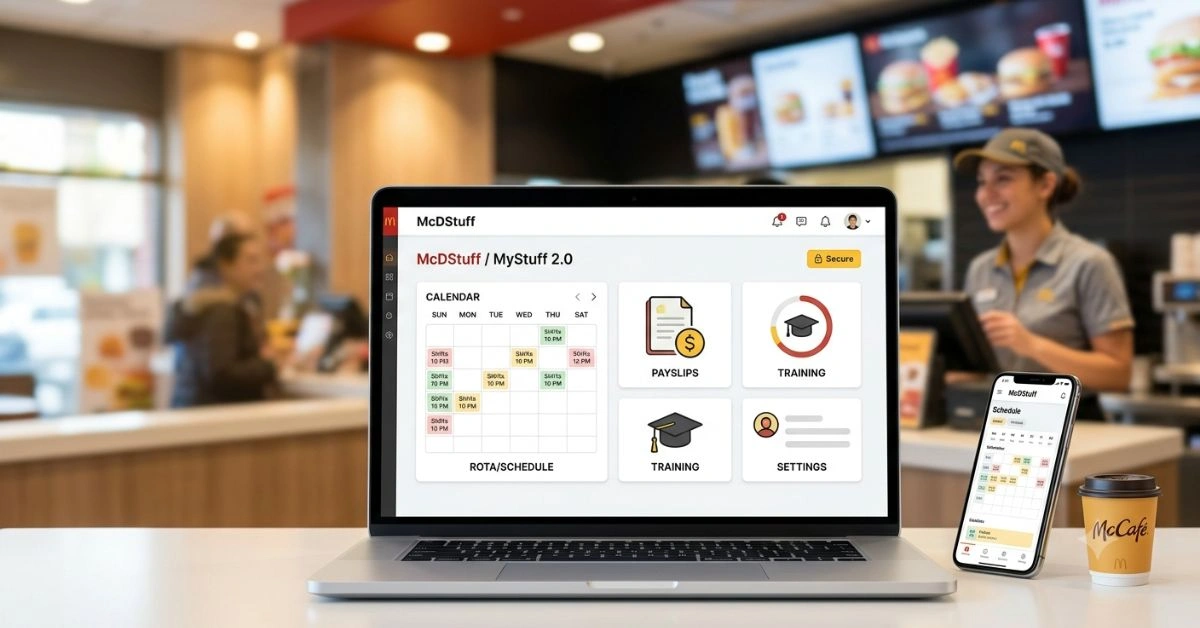
McDStuff, officially known as MyStuff 2.0, powers the daily operations for thousands of McDonald’s team members across the UK. This secure online portal consolidates schedules, pay information, training records, and HR resources into one accessible dashboard. For crew members rushing between shifts or managers balancing staffing, it delivers real-time control without phone calls or paperwork.
This guide draws from years of employee feedback, official processes, and practical usage patterns to equip you with everything needed to maximize McDStuff. Whether starting your first shift or optimizing team management, expect clear, actionable insights that cut through common frustrations.
The Evolution and History of McDStuff
McDonald’s employee systems evolved from paper schedules and manual payslips to digital platforms. MyStuff 2.0 emerged as a major upgrade, replacing earlier versions with a more intuitive interface focused on self-service.
The portal addresses real pain points in fast-food operations: unpredictable shifts, last-minute changes, and the need for immediate pay visibility. By centralizing data, McDStuff reduces administrative burden on restaurant managers and empowers staff with direct access. UK-specific adaptations align with local employment laws, including payslip requirements and holiday entitlements.
Today, mcdstuff.co.uk serves as the primary entry point. It integrates with broader McDonald’s systems, supporting everything from onboarding new hires to performance tracking for long-term crew. This evolution reflects the company’s investment in technology to retain talent in a high-turnover industry.
How to Access and Log Into McDStuff
Step-by-Step Login Process
- Open a modern web browser (Chrome or Firefox recommended) and navigate tomcdstuff.co.uk.
- Choose your login method: McDonald’s Account (SSO) or native credentials.
- Enter your username (often your work email or employee ID) and password.
- Complete two-factor authentication if prompted – a code arrives via email or app.
- Once inside, the dashboard loads with quick links to your rota, payslips, and profile.
New employees receive credentials during onboarding. Contact your manager immediately if details are missing. Ex-employees or associates have a dedicated login path.
Pro Tip: Bookmark the site and clear your cache regularly. Many login issues stem from outdated browser data.
Mobile Access Options
While optimized for desktop, MyStuff 2.0 works on mobile browsers. For on-the-go checks, use your phone during breaks. Some regions complement it with apps like McD Connect for news and team communication, though core HR functions remain on the portal.
Key Features of MyStuff 2.0
Schedule Management (Rota)
The standout feature lets you view upcoming shifts weeks in advance. Swap shifts, request time off, or see coverage gaps directly. Managers approve changes quickly, reducing no-shows and overtime surprises.
Real-world impact: Crew members report better work-life balance when they proactively manage availability. Check the rota every Sunday evening to plan your week.
Payslips and Financial Tracking
Access digital payslips instantly, with breakdowns of hours, rates, deductions, and net pay. Historical records help track earnings for tax purposes or budgeting. Holiday pay and bonuses appear clearly.
For many, this transparency builds trust. Download PDFs for records – no more waiting for physical copies.
Training and Development Hub
Complete mandatory modules on food safety, customer service, and equipment handling. Progress trackers show certifications and upcoming requirements. Managers monitor team compliance to maintain standards.
This section supports career growth: finishing modules unlocks shift leader or manager pathways.
Personal Profile and HR Tools
Update contact details, emergency contacts, and banking information. Submit availability preferences or view performance feedback. Some locations integrate benefits overviews, such as staff discounts or wellness resources.
Communication and Announcements
Central notices cover policy updates, menu changes, or company events. It keeps everyone aligned without relying on group chats that get buried.
Advanced Usage for Crew Members
Seasoned staff leverage McDStuff beyond basics. Set notifications for shift changes if available. Use the availability calendar to block dates early, especially around holidays when demand spikes.
Track hours against contracts to spot discrepancies. Many discover underpaid overtime or missed breaks through detailed logs. Document everything – screenshots of rotas serve as proof in disputes.
For part-timers juggling studies or other jobs, the portal’s flexibility shines. Request consistent patterns, like avoiding early mornings before lectures.
Manager Perspectives: Optimizing Team Performance
Restaurant managers turn MyStuff into a command center. Bulk schedule creation, approval workflows, and labor forecasting tools help control costs while meeting service targets. Real-time absence reporting prevents understaffing crises during peak hours.
Performance data informs coaching. Identify top performers for promotions or address patterns like frequent late arrivals through portal records.
Integration with other systems streamlines payroll processing, reducing errors that frustrate teams. Effective managers review the portal daily, catching issues before they escalate.
Troubleshooting Common McDStuff Issues
Login failures top the list. Solutions:
- Clear browser cache and cookies.
- Try incognito mode or a different browser.
- Verify credentials – usernames sometimes use specific formats like EID@external.mcd.com.
- Reset password via the “Forgot Password” link; it emails instructions.
Schedule not updating? It syncs on set cycles – refresh or wait. Contact your manager for system delays.
Payslip errors require HR escalation with supporting details. Two-factor authentication glitches often resolve by switching networks or devices.
Persistent problems? Restaurant computers sometimes bypass issues better than personal ones. Document steps taken before reporting.
Security Best Practices for McDStuff
Treat your login like bank details. Use a unique, strong password. Never share credentials, even with trusted colleagues. Log out after each session, especially on shared devices.
Enable all available security prompts. Avoid public Wi-Fi for sensitive actions like updating bank info. Report suspicious activity immediately – phishing attempts targeting McDonald’s staff occur regularly.
McDonald’s maintains robust backend protections, but user vigilance prevents most breaches. Regular password changes align with best practices.
Comparative Features: McDStuff vs. Other Retail Portals
| Feature | McDStuff (MyStuff 2.0) | Typical Competitor Portal | Key Advantage for McDonald’s |
| Schedule Visibility | Real-time, swap requests | Weekly PDF or app | Proactive shift management |
| Payslip Access | Instant digital + history | Monthly email | Immediate financial clarity |
| Training Modules | Integrated progress tracking | Separate LMS | Streamlined compliance |
| Mobile Optimization | Browser-based responsive | Dedicated app required | No extra downloads needed |
| Manager Tools | Bulk actions & forecasting | Limited self-service | Faster team adjustments |
This table highlights why McDStuff stands out in high-volume operations. Its balance of simplicity for crew and power for managers fits the fast-paced environment perfectly.
User Experiences and Real-World Impact
Crew members praise the convenience of checking rotas from home, eliminating guesswork. One common story: a student avoiding clashes with exams by requesting adjustments early, preserving both job and grades.
Managers note reduced administrative time, freeing focus for customer service and team motivation. Challenges persist – occasional sync delays or interface quirks – but updates continue improving usability.
Overall satisfaction ties to how well restaurants embrace the tool. Proactive locations with strong manager support see higher engagement and lower turnover.
Career Growth Through McDStuff
View the portal as more than admin. Completed training unlocks opportunities. Consistent availability and reliable performance, visible through records, position you for advancement.
Track metrics like attendance and module completion. Use them in discussions with managers about promotions. Many long-term employees started as crew and climbed using data from the system.
Pair it with broader McDonald’s resources for maximum effect. For financial aspects of employment or verification processes, explore related business tools like those at LendingClub services.
Integrating McDStuff with Daily Workflows
Make it a habit: Check the portal at shift start and end. Update availability promptly. Review payslips within days of processing to catch issues fast.
For teams, encourage collective use. Group chats about rota swaps speed resolutions. Managers sharing tips on advanced features builds capability across the restaurant.
Future of McDStuff and Employee Portals
Expect continued enhancements: better mobile apps, AI-driven scheduling, or deeper analytics. McDonald’s invests in technology to stay competitive in talent acquisition.
Staying adaptable keeps you ahead. Learn new features as they roll out – they often address user-requested improvements.
Comprehensive FAQ on McDStuff
1. What is McDStuff exactly?
McDStuff is the web address for MyStuff 2.0, McDonald’s UK employee self-service portal for schedules, pay, training, and HR tasks.
2. How do I reset my McDStuff password?
Use the “Forgot Password” link on mcdstuff.co.uk. Follow email instructions. Contact your manager if no email arrives.
3. Can I access McDStuff from my phone?
Yes, via mobile browser. Full functionality mirrors desktop, though some prefer larger screens for detailed views.
4. Why can’t I see my full schedule?
Schedules populate on a rolling basis. Check back regularly or ask your manager for updates. New employees may see limited info initially.
5. Is McDStuff secure?
Yes, with enterprise-grade protections and 2FA. Follow personal security habits for best results.
6. How do I request a shift swap on MyStuff 2.0?
Navigate to the schedule section, select the shift, and submit a swap request. Managers review and approve.
7. What if my payslip looks wrong?
Download it, note discrepancies, and speak to your manager or payroll support with evidence.
8. Do ex-employees keep access?
Limited access may remain for historical records. Full functionality ends with employment.
9. Are there alternatives to the website?
Some features overlap with McD Connect app for communication, but core HR lives on MyStuff 2.0.
10. How often should I check McDStuff?
Daily or every few days, especially before and after shifts, to stay on top of changes.
11.Does it work internationally?
Primarily UK-focused. Other countries use region-specific portals.
12. What training is available?
Food safety, customer service, operations, and leadership modules tailored to roles.
13. Can managers see everything I do?
They access team-level data for scheduling and compliance, respecting privacy boundaries.
14. How to update my personal details?
Log in, go to the profile section, and edit contact or banking information. Confirm changes.
15. What browsers work best?
Latest Chrome, Firefox, or Edge. Avoid older versions or Internet Explorer.
This FAQ covers high-search queries based on employee discussions and common pain points.
Maximizing Value from McDStuff
Approach the portal as a partner in your McDonald’s journey. Consistent use builds familiarity, turning potential frustrations into efficiencies. Share effective strategies with teammates – collective mastery improves the entire restaurant’s performance.
For deeper platform evaluations or security insights relevant to work tools, resources like EuroYoung’s reviews offer comparative perspectives on digital services.
McDStuff represents McDonald’s commitment to modern employment practices. Master it, and you gain control over your schedule, finances, and growth opportunities within one of the world’s largest employers.


 – the essential McDonald’s UK employee portal for schedules, payslips, and more. Step-by-step login,)