



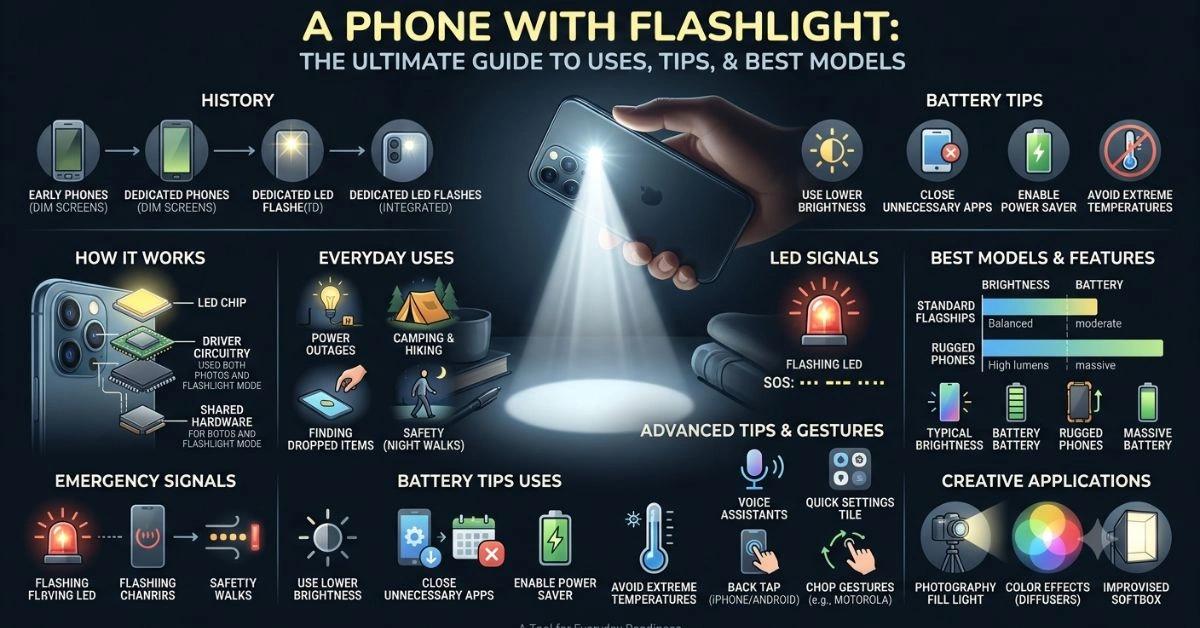
Most of us reach for our phone dozens of times a day without thinking twice. When the lights go out, you drop something under the couch, or you’re walking to your car in a dark parking lot, that quick tap on the flashlight icon changes everything. A phone with a flashlight has become one of the most practical features built into modern smartphones. It turns a communication device into a versatile everyday companion.
This isn’t about hype or flashy marketing. It’s about real-world utility. Whether you’re a parent checking on a sleeping child, a hiker navigating trails after sunset, or someone who just needs to find keys in a messy drawer, the flashlight function delivers immediate value. In this guide, we’ll cover the history, technical details, practical applications, battery management, and recommendations so you can make the most of this feature—and choose hardware that performs when it counts.
The Evolution of Phone Flashlights: From Novelty to Necessity
Smartphone flashlights didn’t start as a built-in feature. Early mobile phones relied on their screens for basic illumination, which was dim and drained power quickly. Dedicated flashlight apps emerged in the late 2000s and early 2010s, hijacking the camera LED to produce brighter light. These apps were often clunky, with permissions issues and inconsistent performance across devices.
By around 2013, major platforms integrated the feature natively. Apple’s iOS 7 brought a dedicated Control Center toggle for the iPhone’s camera flash, making it accessible with a swipe. Android followed with quick settings tiles that improved reliability. What began as a camera accessory for low-light photography evolved into a standalone tool that millions use daily.
Today’s implementations benefit from better LEDs, software optimizations, and hardware refinements. Rugged phones have pushed boundaries further with dedicated high-lumen torches designed for work sites and outdoor adventures. The progression reflects how the user needs shape technology—people want light in their pocket, and manufacturers deliver.
How a Phone Flashlight Actually Works
At its core, the flashlight on your phone uses the same LED (light-emitting diode) that serves as the camera flash. When you activate it, the phone sends power to this LED, which emits bright white light. A small lens or reflector helps focus and diffuse the beam for practical use.
Key components include:
- The LED chip: Converts electrical energy into light efficiently with minimal heat compared to old incandescent bulbs.
- Driver circuitry: Controls brightness levels and prevents overheating.
- Software integration: Allows quick access via gestures, voice commands, or lock screen shortcuts.
- Shared hardware: The same light serves dual purposes—flash for photos and continuous torch mode.
Brightness typically ranges from 30-60 lumens on standard flagships, enough for close-range tasks but not a replacement for a dedicated flashlight in demanding scenarios. Some rugged models reach 1,000+ lumens with larger batteries and better cooling.
Dual or multi-LED setups (like True Tone on iPhones) adjust color temperature for better photos, but in flashlight mode, they combine for maximum output. Heat management is crucial—phones throttle brightness or shut off the light if temperatures rise too high to protect components and battery health.
Everyday and Emergency Uses That Make It Indispensable
A phone with a flashlight shines in situations you encounter regularly. In power outages, it helps you move safely around the house, locate candles or a generator, and check on family. Campers use it for setting up tents, finding gear, or signaling others. Parents appreciate it for midnight feedings or checking closets without turning on bright overhead lights.
Practical scenarios include:
- Navigating dark stairs or hallways at home.
- Searching for dropped items in cars, under furniture, or in bags.
- Reading menus or maps in low-light restaurants or outdoors.
- Automotive repairs—checking oil levels, finding tools in the trunk.
- Outdoor activities like walking dogs at night or hiking.
- Professional uses for inspectors, security personnel, or first responders.
In emergencies, it becomes even more valuable. During natural disasters or blackouts, it provides immediate light without needing extra gear. You can signal for help by flashing patterns (SOS: three short, three long, three short). Some users report using it to deter animals or suspicious individuals by shining bright light in their direction.
For wellness and lifestyle, consider how reliable lighting supports safety during outdoor activities or travel. Features like this align with broader approaches to holistic preparedness, such as those explored in guides on health and outdoor wellness practices (like those from specialized platforms focusing on Vietnam’s holistic wellness scene).
Choosing the Right Phone With Flashlight: What Matters Most
Not all phone flashlights perform equally. Standard models prioritize balance across camera, battery, and size. Rugged phones often excel here because they include larger batteries and purpose-built LEDs.
Look for these factors:
- Brightness (lumens): Higher is better for distance, but real-world performance depends on beam focus.
- Battery capacity: Phones with 5,000mAh+ handle extended use better.
- Build quality: IP68 rating helps in wet conditions.
- Software features: Gestures, always-on access, or integration with voice assistants.
- Heat management: Sustained use without quick throttling.
Popular choices in recent years include flagships from Apple and Samsung for everyday reliability, and rugged options like certain Oukitel or Unihertz models for serious output. Test in-store if possible—real usage trumps specs.
For deeper insights into tech hardware and reviews as we move through 2026, checking honest experiences with platforms and devices can provide additional context on what holds up over time.
Battery Impact and Smart Optimization Tips
One common concern is battery drain. The flashlight draws noticeable power because it keeps the LED at high output continuously. On a typical phone, expect 5-15% drain per hour depending on brightness, model, and background activity.
Effective ways to minimize impact:
- Use the lowest brightness setting that works for your needs.
- Close unnecessary apps and enable battery saver mode.
- Keep software updated—manufacturers optimize power management over time.
- Avoid using it while charging in extreme temperatures.
- Carry a small power bank for longer outings.
- Explore phones with massive batteries if heavy use is expected.
Modern optimization features like adaptive battery and app hibernation help overall, letting you rely on the flashlight without constant worry about running out of juice.
Comparison of Flashlight Performance Across Phone Types
Here’s a practical comparison based on typical reported performance (real results vary by conditions and software):
| Phone Type/Category | Typical Lumens | Battery Impact (per hour) | Best For | Drawbacks |
| Standard Flagship (e.g., recent iPhone/Samsung Galaxy) | 30-60 | Moderate (8-12%) | Daily tasks, quick use | Limited distance, throttles on heat |
| Mid-Range Models | 40-70 | Similar to flagships | Balanced everyday use | Variable software support |
| Rugged Phones (e.g., Oukitel, Unihertz Tank series) | 500-1,200+ | Higher capacity offsets drain | Work sites, outdoors, emergencies | Bulkier design, higher cost |
| Older Models | 20-50 | Can drain faster due to inefficiency | Backup only | Weaker LEDs, poorer heat handling |
This table highlights trade-offs. For most people, a good flagship suffices. Heavy users benefit from rugged options.
Advanced Tips, Gestures, and Creative Applications
Make flashlight use faster and more efficiently. On Android, add the tile to Quick Settings or use gestures like double-tap back (Pixel) or chop motion (Motorola). iPhones offer Control Center and Siri commands. Voice assistants handle hands-free activation perfectly when your hands are full.
Creative ideas go beyond basic lighting:
- Color effects with translucent materials for fun ambiance (great for kids’ activities).
- Photography lighting—use as a fill light or for light painting.
- Signaling in groups or emergencies.
- Improvised softbox effects with diffusers like paper or fabric for portraits.
Always prioritize safety. Avoid shining directly into eyes, especially children’s. Don’t rely solely on it in critical situations where a dedicated light is safer.
Maintenance, Common Issues, and Longevity
Keep your flashlight performing well by cleaning the lens regularly (lint and dust reduce output). Update your OS for bug fixes and optimizations. If the light stops working, check permissions, restart the device, or test in safe mode to rule out app conflicts.
Over years of use, LEDs maintain brightness better than bulbs, but battery degradation affects runtime. Replacing the battery (where possible) or upgrading the phone restores performance.
When a Dedicated Flashlight Still Makes Sense
A phone with flashlight covers most needs, but dedicated lights offer advantages like higher lumens, better ergonomics, longer runtime on replaceable batteries, and durability without risking your primary communication device. Many carry both—a phone for convenience and a small EDC light for serious tasks.
Wrapping Up: Light Where You Need It
A phone with a flashlight exemplifies thoughtful design that solves everyday problems quietly. It enhances safety, convenience, and preparedness without extra cost or weight. By understanding how it works, optimizing usage, and choosing suitable hardware, you get reliable light exactly when needed.
Stay curious about updates—newer models continue improving efficiency and brightness. Test features yourself and build habits around quick access. Your phone is already in your pocket; make the most of its hidden strengths.
FAQs
1. How bright is a typical phone with a flashlight compared to a real torch?
Most produce 30-60 lumens, fine for close tasks but far less than dedicated flashlights (hundreds to thousands of lumens). Rugged phones can close the gap significantly.
2. Does using the flashlight damage my phone battery long-term?
Occasional use has minimal impact. Extended sessions cause heat, which can accelerate wear if frequent. Use moderate brightness and monitor temperatures.
3. Can I use my phone flashlight in the rain?
If your phone has solid water resistance (IP67/IP68), short exposure is usually fine. Dry the lens afterward. Avoid submerging.
4. What’s the fastest way to turn on the flashlight?
Quick Settings tile, Control Center, or gestures/voice commands. Customize for one-handed or lock-screen access.
5. Are there apps that improve the flashlight experience?
Native controls work best for most. Some third-party apps add timers, strobe, or color options, but stick to trusted ones to avoid battery or security issues.
6. How do I signal SOS with a phone flashlight?
Three short flashes, three long, three short—repeat. This pattern is internationally recognized for emergencies.
For More Information Visit Aitrender.